AgentSpace
liveRun a crew of AI agents in a pixel-art office — assign the work, watch it happen, get it delivered.
AgentSpace sets up an AI office on your machine: your crew takes the task, writes the code, runs the tests and reports back with proof. You set the goal — the crew handles the technical work.
.dmg · macOS 13+ · Apple Silicon · v0.4.11
.exe · Windows 10/11 · 64-bit · 152 MB · v0.4.11
AppImage · Linux · x86_64 · 180 MB · v0.4.11
.dmg · macOS 13+ · Intel (x86_64) · 186 MB · v0.4.11
Desktop app — install it on a Mac, Windows or Linux computer.
Intel Mac? Download the x64 build (186 MB)
Different platform?macOS (Apple Silicon)Windows 10/11Linux (AppImage, beta)
Live demo, not a video: the real AgentSpace interface on synthetic data. Touch anywhere and the tour stops — the app is yours. Only the address you type into the email box is stored, to send your discount code.
Muratify desktop
AgentSpace sets up the office; AgentShot adds your screen, AgentVoice adds your voice — and all three are managed from the same Muratify account.
Run a crew of AI agents in a pixel-art office — assign the work, watch it happen, get it delivered.
A screenshot studio — capture, frame and turn it into something shareable in one move.
Speak Turkish and the text lands right where your cursor is — in any app you're in.
Mobile app · your own private network
The phone is not a second product, it's the office's second screen: the same crew, the same board, the same log. You hand out work by voice, open a task and delegate it to an agent, clear a pending approval with one tap. Move through the tabs in the frame on the right, then open Device to see exactly which door the phone comes through.
The interface in the frame is the product's own mobile app: the tabs, the screens and the Device card are all its own. What the phone cannot do stays visible too — no mouse/keyboard, no file deletion, no settings changes on mobile.
Network and data
Your data is on your disk.
Your code, your terminal output, your agent reports and your engine keys stay on your own machine. What follows isn't the slogan — it's the itemised version of it.
STAYS ON YOUR DISK
SYNCS TO YOUR ACCOUNT
The left column is files on your disk — there is no route in the product that ships them to us. The right column is the office record itself: short, countable, and written out here one by one. It sits in columns because it does not fit in a slogan.
The honest version, with the mechanism named — not adjectives. Every sentence below is backed by a line of the product's code.
Agents run in real terminals on your own machine. Terminal output, session logs and agent reports are files on that disk, and the phone reads them straight from your Mac. What syncs to your AgentSpace account is the office record: board cards, your roster, and the memory rules you promote by hand.
Being in a café, on the road or in another city changes nothing: the mobile gateway binds only to your Tailscale address (100.x), and that address is not routed on the public internet. Binding to every interface (0.0.0.0) is refused in code — a setting cannot punch through it. We measured it: from the same Wi-Fi, the same port answers with a refused connection.
Traffic between phone and Mac is encrypted by Tailscale's WireGuard tunnel. There is a per-device token at the door: a request without one gets a 401, you revoke a device with one click from the desktop, and the kill switch cuts every mobile route at once.
What we are not claiming
Not "nothing ever leaves your machine". You bring your own engine with your own key, so your model traffic goes straight to the provider you chose — not to us. And product analytics has no open-text field at all: a prompt, a file path or a key cannot pass the schema, and you can switch analytics off in Settings.
Bring your own engine
AgentSpace doesn't resell tokens. You connect the AI CLI you already pay for, the key stays on your disk, and the plan price covers the office — not the model.
Running today · 10 engines
Assign one to any worker and it spawns in that worker's pane. This list isn't written on this page — it's generated from the app's own engine catalog.
Recommended leads: Claude Code and Antigravity CLI (with Gemini models). Can lead, with some features missing: Codex, Copilot, Goose, Qwen, OpenCode. Workers only: Cursor, Kimi, Crush.
Local and open models (models that run on your own computer or server): you can connect your own server through OpenCode; we do not test this and do not officially support it, and the result depends on the model you pick.
Model providers
Not engines of their own — providers you can point Codex at with your own key. Listed under the engine that actually runs them rather than padding the count.
On the roadmap · 10
Not wired up yet. They're dimmed on purpose: nothing on this wall lights up unless it really runs today.
A new engine on this wall means new code in the product. The running list is generated from the app's engine catalog and a build gate turns red the moment the two drift apart — including if something here quietly starts working and is still shown as "roadmap".
Accounts & usage
Agents never hide which subscription they're burning: the active account is written in the title bar and the tokens spent sit above the pane. When the active account hits its limit, the work doesn't park for five hours — it continues on the idle account, in the same conversation.
Settings → Accounts
Settings → Accounts → "switch to the idle account when the limit hits" — off by default; you turn it on.
Above the pane
This session
0.42M tokens
would cost ~$2.10 on the API
covered by your subscription
All sessions4.02M tokens
By model
running · account A
Step 1 of 4
The agent runs on the first account. The card above the pane shows the real tokens burned in this session and what they would have cost on the API — read from the engine's own ledger, not estimated by us.
The numbers come from the engine's own session files; the card never computes or invents a figure, and it prints "unpriced" instead of a fake $0.
No percentage quota bar
Engines don't publish how much of your quota is left, so we don't draw a bar for it. You get what's actually measurable: tokens spent, the API equivalent, and the hour work resumes.
Open panes keep their account
A switch applies to panes opened (or resumed) afterwards. A process that's already running keeps the account it started with — the app says this on the same screen.
First sign-in is the engine's own flow
Adding a second subscription runs the engine's own login once. After that, moving between signed-in accounts is a single click.
No account sharing
There is no button that exports or imports a token. The only supported case is your own second subscription.
Sign-in state is read from the engine's own status command, never from a local "we started a login" optimism — an account row can only claim to be signed in if the engine says so.
Category comparison
The columns are categories, not brands — each is good at its own job; this table doesn't trash anyone, it counts scope. Category cells summarize today's typical behavior; individual products may differ. Every ✓ in the AgentSpace column has its counterpart on this page — the clips are recorded from the real product.
| AgentSpace | IDE agents | Worktree orchestrators | Chat assistants | |
|---|---|---|---|---|
| Live officeThe crew sits in a pixel-art office, at their desks; who's working, who's idle — at a glance. | — | — | — | |
| Persistent identity + memoryNamed workers with roles; they remember decisions and preferences and pick up where they left off. | Partial | — | Partial | |
| Orchestration + delegationDrop a task on the board — by voice if you like; the lead splits it, the crew runs, work closes with proof. | Partial | Partial | ||
| Parallel isolated workAgents run at the same time, each in its own named terminal session — a real shell, real CLI output. | Partial | — | ||
| Mobile accessThe office in your pocket: watch what your agents are writing, live from your phone. | — | — | ||
| Turkish supportThe interface and voice commands speak Turkish too. | Partial | — | ||
| Bring your own agent (BYOA)Connect the AI CLI you already pay for; the key stays on your disk. | Partial | — | ||
| Your data on your diskWorkspace, memory and keys live on your own machine. | Partial | — | ||
| Open source? | No — the code is closed; your data stays on your disk, and the building process is live on air, in the open. Watch it being built | |||
Category columns name no products and summarize today's typical behavior — these categories evolve fast, and individual products may deviate from the generalization. The AgentSpace column is no generalization: every ✓ is backed by real product recordings on this page.
How it works
Say the goal; the rest is the crew's job. Three steps and the work closes.
Write or speak the goal — “redesign the landing page”. You don't work out the technical detail.
The task lands on the board, the lead splits it into subtasks and the agents run in their own terminals. You watch it live.
The job closes with a result report and evidence — “typecheck + build green”, documented.
From the screen
Every card below is a recording of the real product — no mockups, no staging. Click a card: the clip opens; arrow through, press Esc to close.
Terminal
Worktree orchestrators and terminal-only tools split the screen too. The AgentSpace difference: every split ends in a worker you call by name, with an office behind them.
The recording is not an edit — it's the product: split right, split down, drag the divider — every pane runs its own shell. Collapse the office group and the terminals take the full width.
Office → terminal
Panes aren't called “shell 3” here. Click a worker's sprite in the office and a terminal carrying that agent's own name opens, with the command box now addressing them.
Plenty of tools split a terminal: worktree orchestrators, terminal-only multiplexers. Everyone splits. Nobody puts an agent with an identity at the end of the split — one whose name you know, who has a face in an office, whose terminal appears when you click them. In AgentSpace a split isn't a layout trick; it's your team's seating plan.
Integration Hub
Connect Sentry, GitHub, Supabase and more once from Settings; your agents then work on those platforms for you. No more digging through dashboards to find where a setting lives or how to update it.
Today's catalog
“Sentry is connected — I went through the latest errors myself: 3 new ones; I opened a board task for the most critical.”
“GitHub is connected, but the key lacks ‘Issues: Read and write’. Add that to the token and I'll open the issue myself.”
“Sentry isn't connected. Connect it under Settings → Integrations and I can list and summarize the latest errors for you.”
That “connect it and I'll do X” list isn't invented: the agent reads capability cards derived from each service's real tool list.
Who it's for
The common thread: anyone who wants to delegate the technical work and keep the direction.
Solo founder
Ship a product end to end without writing code: the crew does research, development, testing and the report; you set the direction.
Developer spreading the load
Split the boring, parallel work (refactors, test writing, migrations) across the crew; you stay on the architecture and the hard parts.
Small-team lead
Run an AI crew alongside your human team: hand out tasks on the board, follow progress in one window.
Researcher / analyst
Give competitor sweeps, data gathering and summarising to the agents; sources and tool calls come back marked.
Content & ops
Delegate repetitive production and editing flows; you handle quality control and sign-off.
Manager on the move
Leave the desk — follow what your agents are writing from your phone in read-along mode.
Proof
Muratify's work, this page included, happens in this office every day.
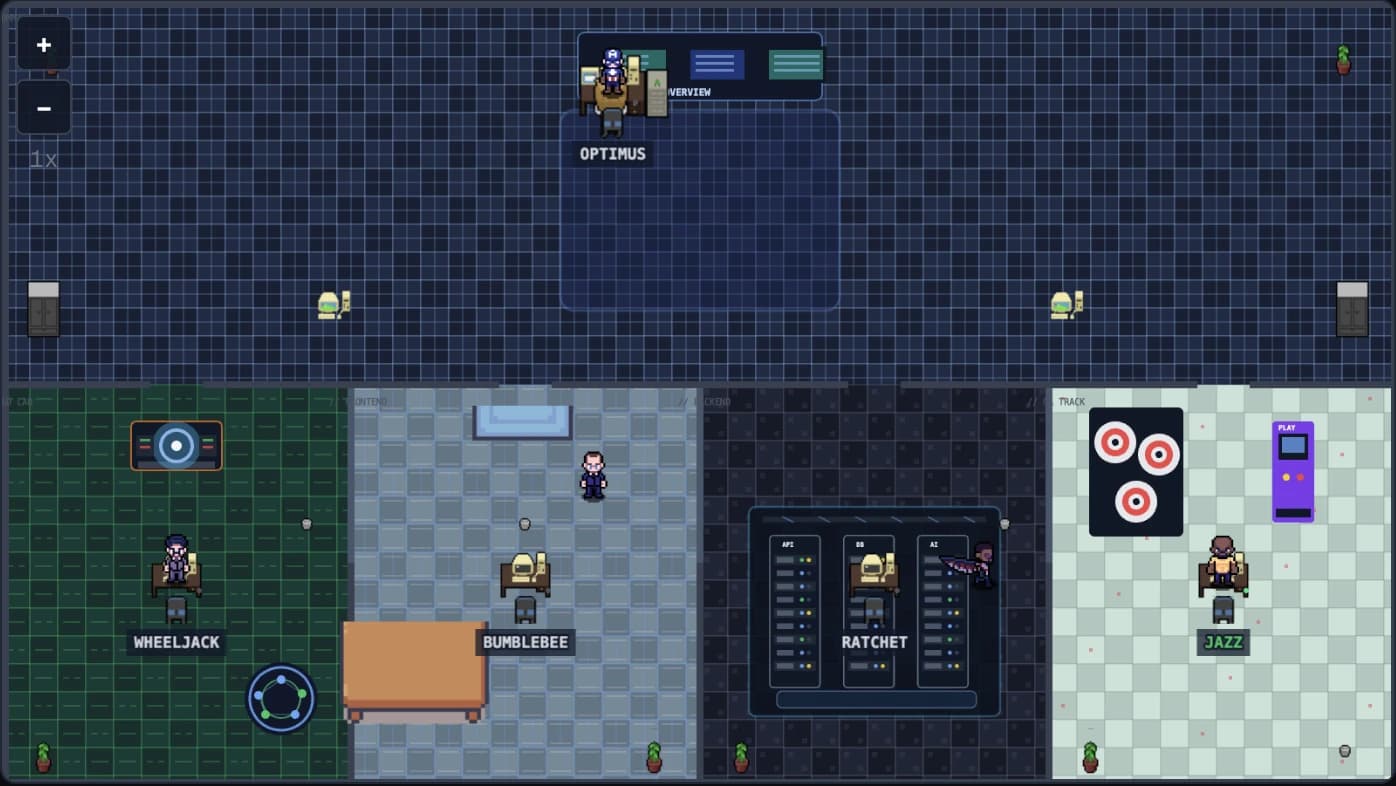
Muratify's own crew — these agents built this page too.
AgentSpace is the system running at Muratify every day: the lead splits the work, the crew runs it, review happens live. Even this site was built with it.
No other product gives you a genuinely working crew, gamified management and a non-coding founder at the same time.
Agents with characters, an office metaphor, live speech bubbles — managing it is enjoyable, not a dry dashboard.
“Even if you don't write software, build your own AI company visually and run it like a boss.”
What users say
What do AgentSpace users write in the stream chat? We picked the messages and didn't touch a single letter. They're in Turkish, exactly as written, with an English translation under each one.
Picked from the stream chat · as written, uncorrected
2 gündür Agentspace kullanıyorum muhteşem ötesi hızlandım eline emeğine sağlık başarılar dilerim tekrardanTranslation I've been using AgentSpace for 2 days, I've sped up beyond amazing, thank you for all your work, wishing you success again
Translation
If anyone wants to buy it but has doubts, you should definitely give it a chance
Showing 39 comments
Translation
The interface is really nice now, work genuinely gets done efficiently, everything has become great for making the job easier.
But the new version is on fire, I don't even know how to describe it. Here, let me put it this way.
Today in a meeting with a client, instead of thinking twice, I said deadlines are no problem and moved on
This is genuinely thanks to AgentSpace, it gives me confidence now, it works, it speeds things up. I've even noticed I work more organised than before, because everything — my reports, my code, history, memory
all in one place, I've become more organised.
Before, I kept notes somewhere else. Our code sat on a local server, we had no system really, but since I switched to AgentSpace I don't use notes because the Lead keeps track. So there's a lot
I don't want to praise the program like a flatterer, some people criticise and say don't exaggerate, but this isn't something you can exaggerate, its impact on me is huge.
huge, I've become 10x, honestly, I swear I've become 10x
Translation
The AgentSpace system is efficient. It manages tokens well
I recommend it, I bought it. It's extremely stingy with tokens
My work sped up after I got AgentSpace.
With task cards and autopilot it finishes the work in a single night. You wake up in the morning and the work is done
It'll be even better with the new version
I looked at the other products on the market too, I haven't come across one this good. And Murat ships every request we make within two days.
Translation
I tried a few products on the market too. None has the ease and the breadth of AgentSpace.
Translation
bro I've been a software developer for 9 years. you've really done a great job. the office visuals especially are very creative.
Translation
Even you building this app for us is a great thing
AgentSpace is a great thing
And in Turkish too
Translation
this app is too comprehensive to be a CLI
I spent a week writing code to build an agent team, then when I found AgentSpace I deleted all of it 😀 no need.. it's a hassle anyway and it never turns out the way we want
Translation
keep going king, you're the man, the UI has gotten nice
Translation
I was away for a few days, I saw it in the earlier video. controlling it from the phone turned out really well
Translation
congratulations, you've built something big, I wish you success
Translation
we're FLYING with AgentSpace muratttt
Translation
the system has come a long way in 60 days
Translation
AgentSpace is really good
Excellent app
The reports and tasks part, picking up where you left off and so on, is great
AgentSpace is definitely worth buying
As far as I'm concerned, no app beats this one
I don't use Claude so I can't say, but AgentSpace is beyond great
Honestly, it turned out great
The hand gesture feature is really good
Translation
Great job, well done. We can't wait for the new version. When is it coming?
Translation
this AgentSpace makes a lot of sense for me
autopilot is the real deal, the rest is just excitement
Translation
We're with you for life 🙂 exactly.
Translation
the reports feature turned out really nice
Translation
and honestly, at this price the product is basically free
team management, being able to talk to the lead (not type) and having 8-10 workers constantly working on the side while I chat is great. + we can cut costs by picking a CLI like opencode for some weaker workers
oh and even when I'm out, autopilot keeps doing the tasks
the reporting is really good too. we can read it in detail
we've been coding 24/7 for 4-5 days 😀 I haven't written a single line yet... it finished what would normally be 20-30 days of work for me
Translation
the reports and decisions are incredible, really good for keeping track: when I approve a decision the lead sees it right away and does the delegation
it's getting much better every day.
Translation
Honestly, is there anyone who bought AgentSpace and isn't enjoying it?
genuinely the best purchase I've ever made
I always overthink things, and I did with AgentSpace too, but I don't know of another piece of software with someone behind it who really knows what they're doing and listens to its users this much
we ask for a feature and by the evening he's building it live on stream, right in front of my eyes :)
I give feedback and a week later I get it in an update :)
Translation
For anyone curious who hasn't bought it yet, let me share a quick note too. I was using VS Code. After buying this app I started getting higher-quality output. And I got at least 5x faster.
Translation
Have a good stream, bro. I've gotten a lot faster with AgentSpace over the last 3–4 days. I'm a civil engineer myself. I'd built software for my company, but it was hard going in VS Code. It takes a bit of getting used to, but it's going really well now
Translation
Seriously though, Murat, jokes aside, the software that comes out of AgentSpace is the real deal — I write two sentences and out comes a program thought through down to the last detail. knock on wood
Translation
honestly, I use your AgentSpace regularly and I've started taking on a few jobs, I'm working on building them out :)
no joke, I've used it nonstop for a month and a half — why was I even using that Claude that kept forgetting everything before :)
Translation
Guys, Muratify has really pulled off something big. How do I know? I've been trying to build a system like this for myself for months, and believe me, it isn't easy.
And the lifetime membership makes a lot of sense
Translation
yep, I use it, it's great, especially the remote access — superb
thanks to you we're comfortably building 3–5 apps at the same time
Translation
honestly, I've delivered 3 web projects with AgentSpace. Everything's going fine. Now if there were an interface or some method for managing Google Ads and social media ads, this place would be on fire.
Translation
I'm good, and I'm honestly enjoying using AgentSpace a ton right now. I make Claude the team lead and give all the other staff to Codex.
I'm developing my project really fast right now. Also, I solved the problem I wrote to you about yesterday — Claude and Codex can now talk to each other properly; they developed their own skills to solve it
Translation
Just so you know, defining agents on the Claude side isn't that easy. I'm trying it with Codex + Claude, and the agents still don't listen to the main agent. What this guy has built is a real blessing, I'm telling you.
Translation
today a client on WhatsApp asked for revisions on a long image with an 8–10 item list. I dropped that image into AgentSpace, and it took screenshots of the relevant sections of the image and...
did something amazing
and using these images, the tasks
it created
Translation
We've come to terms with AgentSpace, by the way — the first few days felt confusing, now we're running like clockwork. Thanks for your work; now and then there are issues, and I report them anyway
Translation
honestly, this was just a trial. I'm getting to know AgentSpace. but it's very handy. congrats again. I want to start an AI short-film company.
Translation
you built AgentSpace with Claude Code — how long did it take to get it to this point? I really appreciate the system
Translation
the new feature that adds a team member straight from the lead's suggestion is nice 🙂
Translation
Yes, it does. I've got 15 or so accounts; I hooked them into Codex in a single context — when one runs out of credit it switches to the next and carries on, passing the history over.
Translation
Exactly, because right now I'm running a few test chats and all of them answer with a real command of the subject. Normally when I talk to Claude it doesn't give answers like these
Translation
by the way, nothing like Grok bot works this well; with those you still have to put in a lot of effort yourself
I used Grok bot but couldn't get anywhere, I had to do everything myself
Translation
AgentSpace honestly amazes me.
It hasn't even been a week since I bought it, I casually had it build a mobile app and it's in review right now. It's honestly worth the price 🙏👏👏👏
Translation
I have the tasks written up. It has the agents write 24/7 😀 reads the reports, has them tested and accepts the work based on that
a real team
I'd written a framework for myself, they're doing its testing and improvements
Translation
I just discovered you, I came here after watching your videos too. I'm thinking of buying AgentSpace, I'm tired of writing code and development takes so long. I think I've come to exactly the right place
I bought lifetime and came back, after the stream I'll start with the energy from here 🙈
Proof
Every line below ends in a source you can open — you don't have to take our word for any of it.
This product wasn't written behind closed doors. From day 1 the work has been live on stream, and the whole archive is still public — open any of it.
Open the stream archiveThree desktop apps, every release shipped with public notes. This number isn't typed by hand — it is read from the release feed, so it cannot go stale.
See the release history45 AI agents · 2.960 tasks · 2.888 commits. These come from our own board — but you can watch that board and those agents on screen in the streams.
Watch what it looks likeEach line opens the «fixes from customer reports» item in that release's public notes. No reporter's name, handle or message appears anywhere — we don't quote anyone without permission.
None of these figures is typed by hand: they were measured at source on 2026-09-07 — the stream archive, our own task board and the repository history. The archive hours carry a «+» because a stream still on air is not counted yet. The tempo line is read live on every load.
Price
LAUNCH OFFER
Enter LAUNCH50 at checkout — the amount halves instantly.
The discount applies across the Muratify AgentSpace ecosystem — AgentSpace plans plus AgentShot and AgentVoice. It does not apply to ChatFlow plans.
After the discount ends the plan renews at its normal price; you can cancel any time — cancelling also ends the discount. The refund rule also covers coupon purchases.
Solo start — the first step
Discounted price: $9.50Billed monthly · cancel any time
LAUNCH5050% off first 3 months · then $19/mo
Start with BasicFor serious daily use
Discounted price: $14.50Billed monthly · cancel any time
LAUNCH5050% off first 3 months · then $29/mo
Start with Pro AgentVoice and AgentShot included
Several machines, priority support
Discounted price: $24.50Billed monthly · cancel any time
LAUNCH5050% off first 3 months · then $49/mo
Lifetime · one payment ↓Discounted price: $149.50Sign in with your account — the plan you picked and the same price are waiting at checkout; LAUNCH50 is applied automatically.
Prices in USD. You buy from your Muratify ID account portal — one login unlocks every plan and app. AgentVoice and AgentShot are included with Pro and Ultra. Price changes apply to new subscribers only; your subscription renews at the price you joined on unless you change your plan.
Supported engines
Runs on your own engine subscription — token costs are not part of the plan price, and both the key and your privacy stay with you.
Recommended leads: Claude Code and Antigravity CLI (with Gemini models). Can lead, with some features missing: Codex, Copilot, Goose, Qwen, OpenCode. Workers only: Cursor, Kimi, Crush.
Local and open models (models that run on your own computer or server): you can connect your own server through OpenCode; we do not test this and do not officially support it, and the result depends on the model you pick.
…plus 10 more engines on the roadmap — listed separately on the product page, never shown as running.
LIFETIME · PAY ONCE
28 owners · next license #29No subscription, no renewal, no surprises. One payment; the plan stays on your account.
Ultra · Lifetime
Discounted price: $149.50LAUNCH5050% off the one-time payment
Buy lifetime — License #29Refund within 7 days if it doesn't work as described — coupon and lifetime included
Against the Ultra yearly plan
yearly $399lifetime
You pay $449 less over 2 years — lifetime pays for itself in 9 months.
Everything in Ultra comes with lifetime too: cloud sync, phone control, 4 devices and every update — forever.
| BasicDiscounted price: $9.50 | RecommendedProDiscounted price: $14.50 | UltraDiscounted price: $24.50 | |
|---|---|---|---|
| Your AI crew | |||
| AI workers (agents) | 3 | Unlimited | Unlimited |
| Workspace | 1 | Unlimited | Unlimited |
| Bring your own engine — Claude Code, Codex, GitHub Copilot CLI, Goose, Qwen Code, OpenCode, Cursor CLI, Kimi Code (motor), Crush, Antigravity CLI, Groq, DeepSeek, Kimi K2/K3 (Moonshot — model) | |||
| Hands-off mode | — | ||
| Tasks started at once | 3 | 12 | 12 |
| Integrations | |||
| Connected integrations | 2 | All | All |
| Devices | |||
| Devices at once | 1 | 2 | 4 |
| Registered devices | 2 | 4 | 10 |
| Remote control from your phone | — | ||
| Cloud sync | — | ||
| Included products | |||
| AgentVoice — voice dictation | — | ||
| AgentShot — screenshot studio | — | ||
| Design tour | — | ||
| Ultra only | |||
| 4 devices at once | — | — | |
| Feature suggestions from the app | — | — | |
| Lifetime option | — | — | |
| Support & community | |||
| Support | Community (Discord) | Priority · 1 business day | |
| Direct line to the founder | — | — | |
| Community access | |||
Value breakdown
Pro $29/moonly $1 a month more than buying separately
That difference buys these lines — only in Pro:
FAQ
It lets a one-person team coordinate several AI agents — hand out work, watch it live, get it delivered with proof. The agents do the technical work; you manage it like a boss.
IDE agents give you one agent inside one editor session; AgentSpace runs a TEAM. Every agent has a persistent identity, its own role, its own real terminal and memory that survives between sessions; work lands on a task board that you hand out and watch live. The unit of work is “my crew ships this”, not “write me some code”.
Yes — Claude Code is one of the engines AgentSpace runs today. You assign it to a crew member and it opens as a real session in that member's own pane, so you watch every command and every line of output. It runs on your own subscription or key; AgentSpace never swaps the model on you.
The engines that actually run today: Claude Code, Codex, GitHub Copilot CLI, Goose, Qwen Code, OpenCode, Cursor CLI, Kimi Code (motor), Crush, and Antigravity CLI. Underneath them you can also point Codex at provider models with your own key: Groq, DeepSeek, and Kimi K2/K3 (Moonshot — model). The list is not hand-maintained on this page — it is generated from the app's own engine catalogue, and the engine wall above always shows the current state.
Yes — BYO-key. Your agents use your own CLI key or subscription; token costs and privacy stay entirely with you. A step-by-step key wizard helps during setup.
Your token bill comes from your own AI provider, not from AgentSpace — we sell no tokens; the plan pays for the office, not the model. Limits, model choice and spend stay in the CLI subscription you already manage. You also decide which agent runs on which engine, so heavy work can go to a strong engine and routine work to a cheap one.
Your plan sets the crew size: Basic comes with a limited number of agents and a single workspace, while Pro and Ultra make both unlimited. How many run at once is up to you — each agent works in its own pane, so queueing them or starting them in parallel is your call. In practice the ceiling is your machine, not your licence.
Agents work on your machine, in the workspace you point them at, in REAL terminals — every command and every line of output scrolls in front of you, with no hidden channel. You scope what they may do through the task itself, and starting agents in bulk needs your approval. As with any serious work, version control is the safety net: you review the diff when you take delivery.
Your code, your files and the memory files your agents write stay on your disk, and the agents work in real terminals on your own machine. Because you bring your own key, your model traffic goes straight to the provider you chose, not to us. What syncs to the cloud is the office record: your Muratify account and licence, your roster, your board cards (title, description, status, assignee) and the memory rules you promote by hand — never your code, your files or your terminal output.
No — the code is closed; your data is on your disk, and the build process is open on a live stream. We build the product with our own agent crew and share that process openly; closed source does not mean your data sits with us.
No — that's exactly what AgentSpace is for. Talk or type, build your team visually, click to manage your agents. The technical work is theirs.
macOS (Apple Silicon) and Windows 10/11 (64-bit, early access), plus a mobile read-along mode. Both installers are on the download page.
Yes — a mobile companion mode mirrors your desktop office on your phone. You see who is working on what and where each task stands, read agent output in read-along mode, and answer pending permission prompts from the phone. The desktop app is what does the work; the phone is for following it and approving. Setup steps are inside the app: Settings → Devices → Connect your phone. Your phone connects to your computer over a private network (Tailscale).
Yes — the interface is Turkish and the voice commands were built for Turkish specifically (including a Turkish morphology layer and end-of-sentence detection). You brief your agents in Turkish and get their reports in Turkish. We build the product itself while using it in Turkish.
Get the app from the download page (muratify.com/download) — macOS or Windows — install it and sign in with Muratify ID; your first AI crew is up in a few minutes. Purchases and licences live in the same Muratify account; one login opens all three apps.
Ultra has features that Pro does not: 4 devices at once (Pro: 2), feature suggestions from the app and a lifetime option. On top of that comes priority support: a reply within 1 business day and a direct line to the founder. Pro makes workers and workspaces unlimited, turns on hands-off mode, phone remote control, cloud sync and the design tour, and includes AgentVoice and AgentShot. Basic is for starting solo: a limited number of workers, one workspace and one device at a time.
On Ultra your request goes to the front of the queue and you get a reply within 1 business day (Mon–Fri). You can write to the founder directly, and we help you one-to-one with the first setup. You can send feature suggestions from inside the app; the founder reads and answers every one. Bug reports are open on every plan.
Yes. If a feature we describe on this site doesn't work, write to us and we'll look into it together. If we can't fix it, we refund your money within 7 days. Purchases with a campaign code (LAUNCH50) and lifetime purchases follow the same rule. The details are on the refund policy page.
Only Ultra. Pro has no lifetime option: while a one-time payment stayed cheaper than a year of the subscription, the yearly plan made no sense — so lifetime now lives in a single tier, at the top end. Basic and Pro are monthly or yearly.
AgentVoice, AgentShot and ChatFlow — every product we ship — is built by the agent crew inside AgentSpace. This page included.
Refund request / Write to us →Full refund policy
Get started
Download it, set up your crew, give it the first task — let the crew carry the technical work.
.dmg · macOS 13+ · Apple Silicon · v0.4.11
.exe · Windows 10/11 · 64-bit · 152 MB · v0.4.11
AppImage · Linux · x86_64 · 180 MB · v0.4.11
.dmg · macOS 13+ · Intel (x86_64) · 186 MB · v0.4.11
Desktop app — install it on a Mac, Windows or Linux computer.
Intel Mac? Download the x64 build (186 MB)
Different platform?macOS (Apple Silicon)Windows 10/11Linux (AppImage, beta)
Sign in with your Muratify ID after installing. No account? It takes a minute at accounts.muratify.com.
Sign in with Muratify ID